Counting Shortest Grid Paths
- Write a function
count_paths(orcountPaths) that takes two integers $a \ge 0$ and $b \ge 0$ and returns the number of shortest paths from $(0,0)$ to $(a,b)$ on a 2D grid.
A shortest path:
- consists only of moves to the right $(1,0)$ or up $(0,1)$,
- and has exactly $(a + b)$ steps.
Here is an illustration of two example shortest paths from $(0,0)$ to $(8,5)$

- Hint: consider the last step of such a path.
- If the last step is from $(a-1, b)$, how many paths lead there?
- If the last step is from $(a, b-1)$, how many paths lead there?
- Define a function
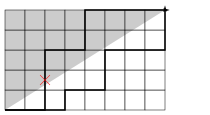
count_paths_below(orcountPathsBelow) that counts the number of shortest paths from $(0,0)$ to $(a,b)$ that never go strictly above the straight line connecting $(0,0)$ and $(a,b)$.
- Here is an illustration; one of the shortest paths now does not qualify as it goes into the prohibited area
Boilerplate source files
{go,jl,ml,rs}/count_paths.{go,jl,ml,rs}containing the test code is generated and shown below.Edit the source files either by opening them in a text editor (e.g., vscode), or editing the cells below and executing them.
In [ ]:
import heytutor
1-2. Examples
1-2-1. A general question
%%hey
How to write a function in Go?
1-2-2. A hint on this specific problem
%%hey
Give me a hint on this problem for Rust
1-2-3. NEW: A few builtin variables
{file:FILENAME}is the content of FILE{bash[-1]}is the output of the last%%bash_cell,{bash[-2]}that of the second last%%bash_cell, etc.{problem}is the content of the file you specified by%%hey problem_file=foo.md{answer}is the content of the file you specified by%%hey answer_file=go/foo.go
1-2-4. Help when you struggle
%%hey answer_file=go/foo.go
I get this error when I compile it. What's wrong?"

My program:
{answer}

Error message:
{bash[-1]}
1-2-5. Ask feedback
- You are encouraged to ask a feedback once you think you are done with the problem, to know if there is a better answer. You can do so by something like:
%%hey problem_file=foo.md answer_file=go/foo.md
Give me a feedback to my answer.

Problem:
{problem}

My Answer:
{answer}
2. Go
2-1. Baseline code
In [ ]:
import heytutor
In [ ]:
%%writefile_ go/count_paths.go
package main
import "fmt"

/** begin my answer */

func countPaths(a, b int64) int64 {
	if a == 0 || b == 0 {
		return 1
	} else {
		return countPaths(a - 1, b) + countPaths(a, b - 1)
	}
}

func countPathsBelowRec(p, q, a, b int64) int64 {
	if p == 0 || q == 0 {
		return 1
	} else if -b * p + a * q > 0 {
		return 0
	} else {
		return countPathsBelowRec(p - 1, q, a, b) + countPathsBelowRec(p, q - 1, a, b)
	}
}

func countPathsBelow(a, b int64) int64 {
	return countPathsBelowRec(a, b, a, b)
}
/** end my answer */

func main() {
	if !(countPaths(7, 3)        == 120)       { panic("wrong") }
	if !(countPathsBelow(7, 3)   == 12)        { panic("wrong") }
	if !(countPaths(12, 8)       == 125970)    { panic("wrong") }
	if !(countPathsBelow(12, 8)  == 7229)      { panic("wrong") }
	if !(countPaths(17, 13)      == 119759850) { panic("wrong") }
	if !(countPathsBelow(17, 13) == 3991995)   { panic("wrong") }
	fmt.Println("OK")
}
2-2. Compile
In [ ]:
%%bash_
export PATH=${PATH}:~/.local/go/bin:~/go/bin
go build -o go/count_paths go/count_paths.go
- Note: when you run
goor other Go commands in a terminal (SSH or Jupyter terminal), you need to execute the first line (export PATH=${PATH}:~/go/bin) - You may consider adding that line in your
~/.bash_profile
2-3. Run
In [ ]:
%%bash_
go/count_paths
2-4. Ask Questions or Get Feedback
In [ ]:
%%hey problem_file=count_paths.md answer_file=go/count_paths.go

Problem:
{problem}
My Answer (between /** begin my answer */ and /** end my answer */):
{answer}

Give me a feedback to my answer.
3. Julia
3-1. Baseline code
In [ ]:
import heytutor
In [ ]:
%%writefile_ jl/count_paths.jl
### begin my answer

function count_paths(a, b)
    if a == 0 || b == 0
        1
    else
        count_paths(a - 1, b) + count_paths(a, b - 1)
    end
end

function count_paths_below_rec(p, q, a, b)
    if p == 0 || q == 0
        1
    elseif -b * p + a * q > 0
        0
    else
        count_paths_below_rec(p - 1, q, a, b) + count_paths_below_rec(p, q - 1, a, b)
    end
end

function count_paths_below(a, b)
    count_paths_below_rec(a, b, a, b)
end

### end my answer

function main()
    @assert count_paths(7, 3)         == 120
    @assert count_paths_below(7, 3)   == 12
    @assert count_paths(12, 8)        == 125970
    @assert count_paths_below(12, 8)  == 7229
    @assert count_paths(17, 13)       == 119759850
    @assert count_paths_below(17, 13) == 3991995
    println("OK")
end

main()
3-2. Compile
- Julia code is compiled "just in time" (compiled upon executed), so does not need a specific action for compilation before you run
3-3. Run
In [ ]:
%%bash_
export PATH=${PATH}:~/.juliaup/bin
julia jl/count_paths.jl
- Note: when you run
juliaor other Julia commands in a terminal (SSH or Jupyter terminal), you need to execute the first line (export PATH=${PATH}:~/.juliaup/bin) - You may consider adding that line in your
~/.bash_profile
3-4. Interactive execution
juliacommand also serves is an interactive command for Julia programsYou can run a source code and continue interaction
$ julia -i jl/count_paths.jl
- For trial and error, you may also consider creating a Julia notebook
3-5. Ask Questions or Get Feedback
In [ ]:
%%hey problem_file=count_paths.md answer_file=jl/count_paths.jl

Problem:
{problem}

My Answer (between ### begin my answer and ### end my answer):
{answer}

Give me a feedback to my answer.
4. OCaml
4-1. Baseline code
In [ ]:
import heytutor
In [ ]:
%%writefile_ ml/count_paths.ml
(** begin my answer *)

let rec count_paths a b =
  if a = 0 || b = 0 then
    1
  else
    count_paths (a - 1) b + count_paths a (b - 1);;

let rec count_paths_below_rec p q a b =
  if p = 0 || q = 0 then
    1
  else if -b * p + a * q > 0 then
    0
  else
    count_paths_below_rec (p - 1) q a b + count_paths_below_rec p (q - 1) a b;;

let count_paths_below a b = count_paths_below_rec a b a b;;
(** end my answer *)

let main () =
  assert ((count_paths 7 3)         = 120);
  assert ((count_paths_below 7 3)   = 12);
  assert ((count_paths 12 8)        = 125970);
  assert ((count_paths_below 12 8)  = 7229);
  assert ((count_paths 17 13)       = 119759850);
  assert ((count_paths_below 17 13) = 3991995);
  Printf.printf "OK\n"
;;

main()
4-2. Compile
In [ ]:
%%bash_
eval $(opam env)
ocamlc ml/count_paths.ml -o ml/count_paths
- Note: when you run
ocamlcor other OCaml commands (see below) in a terminal (SSH or Jupyter terminal), you need to execute the first line (eval $(opam env)) - You may consider adding that line in your
~/.bash_profile
4-3. Run
In [ ]:
%%bash_
ml/count_paths
4-4. Interactive execution
ocamlcommand is an interactive command for OCaml programsIn terminal (Jupyter or SSH), you can directly run a source code
$ eval $(opam env)   # once in your session or put it in ~/.bash_profile
$ ocaml ml/count_paths.ml
- You can run a source code and continue interaction
$ eval $(opam env)   # once in your session or put it in ~/.bash_profile
$ ocaml -init ml/count_paths.ml
- For trial and error, you may also consider creating an OCaml notebook
4-5. Ask Questions or Get Feedback
In [ ]:
%%hey problem_file=count_paths.md answer_file=ml/count_paths.ml

Problem:
{problem}

My Answer (between (** begin my answer *) and (** end my answer *)):
{answer}

Give me a feedback to my answer.
5. Rust
5-1. Baseline code
In [ ]:
import heytutor
In [ ]:
%%writefile_ rs/count_paths.rs
/** begin my answer */

fn count_paths(a: i64, b: i64) -> i64 {
    if a == 0 || b == 0 {
        1
    } else {
        count_paths(a - 1, b) + count_paths(a, b - 1)
    }
}

fn count_paths_below_rec(p : i64, q : i64, a : i64, b : i64) -> i64 {
    if p == 0 || q == 0 {
        1
    } else if -b * p + a * q > 0 {
        0
    } else {
        count_paths_below_rec(p - 1, q, a, b) + count_paths_below_rec(p, q - 1, a, b)
    }
}

fn count_paths_below(a : i64, b : i64) -> i64 {
    count_paths_below_rec(a, b, a, b)
}

/** end my answer */

fn main() {
    assert!(count_paths(7, 3)         == 120);
    assert!(count_paths_below(7, 3)   == 12);
    assert!(count_paths(12, 8)        == 125970);
    assert!(count_paths_below(12, 8)  == 7229);
    assert!(count_paths(17, 13)       == 119759850);
    assert!(count_paths_below(17, 13) == 3991995);
    println!("OK");
}
5-2. Compile
In [ ]:
%%bash_
. ~/.cargo/env
rustc rs/count_paths.rs -o rs/count_paths
- Note: when you run
rustcor other Rust commands in a terminal (SSH or Jupyter terminal), you need to execute the first line (. ~/.cargo/env) - You may consider adding that line in your
~/.bash_profile
5-3. Run
In [ ]:
%%bash_
rs/count_paths
5-4. Ask Questions or Get Feedback
In [ ]:
%%hey problem_file=count_paths.md answer_file=rs/count_paths.rs

Problem:
{problem}

My Answer (between /** begin my answer */ and /** end my answer */):
{answer}

Give me a feedback to my answer.